Important information for Year 7, 2026

This guide is intended to help build capacity in your children to successfully navigate moving from primary school to Engadine High School. Please view the guide below.
Download your Transition Guide
The student handbook provides a comprehensive overview on procedures, expectations and extra-curricular opportunities at Engadine High School. It provides important information for students and parents on general day-to-day operations of the school
Download your Student Handbook
What do I need to know about technology requirements at EHS?
At EHS, students are encouraged to bring a personal learning device, such as a laptop or similar, to support their learning in the classroom. Having a device each day enables active participation in learning activities. If you have any concerns about providing a device, please contact the school. We are committed to supporting all students to access the technology they need for their learning.
Device Advice
Screen and Keyboard: Minimum 11" screen with a physical keyboard to support diverse learning activities.
Compatibility: Must support a broad range of educational apps and desktop programs currently in use or expected to be adopted.
Wireless Connectivity: Support for dual-band Wi-Fi (2.4GHz and 5GHz) remains essential, with additional support for Wi-Fi 6 (802.11ax) or newer recommended where possible to future-proof network performance.
Portability: Lightweight devices, preferably under 1.5kg to assist with ease of mobility.
Battery Life: Minimum 6-hour battery life; longer battery life preferred as technology advances.
Ports: Include USB ports; USB-C ports for charging and data transfer are increasingly common and recommended.
Processor / Performance:
Windows: At least Intel Core™ i3, i5, or i7 of 10th generation or newer (or equivalent AMD Ryzen processors), to handle evolving software demands.
Apple: Devices capable of running the latest MacOS versions (macOS 13 Ventura or later) and with Apple Silicon (M1 or later) for enhanced performance and efficiency.
Storage: Minimum 128GB internal storage; consider 256GB or more on devices to accommodate increasing application complexity and offline file storage needs.
Operating System:
Windows: Windows 11 or newer (anticipate Windows 12 or its successor by 2026) for all new devices, as mainstream support for Windows 10 ends October 2025.
MacOS: macOS 13 Ventura or later, ensuring support for security updates and new features through 2026 and beyond.
What software should I instal and where do I get it from?
Login to your student portal via the portal.education.nsw.gov.au website.
Follow the links to download Microsoft Office 365. This link will give you up to 15 licences to use on different devices, such as your home desktop, laptop and mobile devices.
Google workspace can be downloaded for free through the App Store, Android Market, or direct from the Google Drive website, just be sure to login with @education.nsw.gov.au
Apps will be specific to each subject and teachers will inform students if necessary.
Further information can be found in our Technology Handbook
Year 7 stationary packs can be purchased through WINC and delivered to your home (with free delivery is ordered before 15th December, 2025).
Please order using the following guide.
*TIP: When selecting subjects, please tick all 9 boxes – this to ensure that general stationery and specific subject requirements are included in your order.
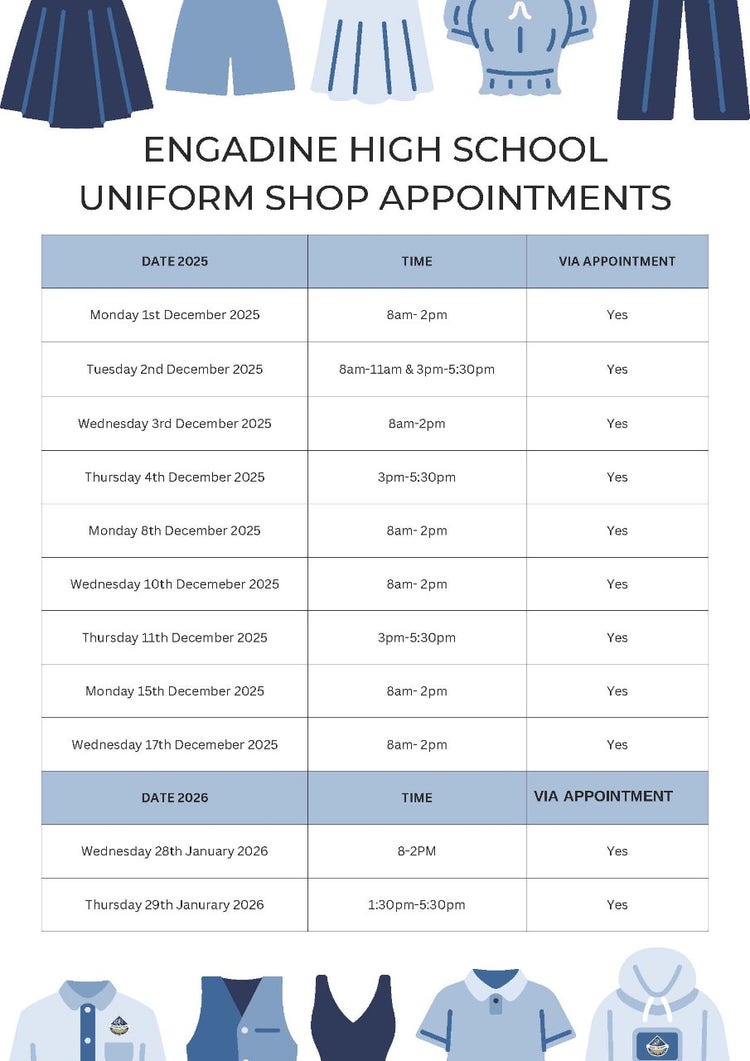
To book your appointment, please use the following link:
For more information on our uniform, please click here
| Start date for Year 7, 2026 | Monday 2 February 2026 |
| Year 7 Meet & Greet | Tuesday 17 February 2026 |
| Swimming Carnival | Friday 20 February 2026 |
| NAPLAN | 11-23 March 2026 |
| School Photos | Thursday 26 March & Friday 27 March 2026 |
| Camp - The Tops | Wednesday 22 April - Friday 24 April 2026 |
| Athletics Carnival | Friday 15 May 2026 |
Details on the School Opal card can be found in the following flier.
Have a question for our principal or teachers?
Our friendly office team can help you get in touch.
Learning
Find out about our approach to learning and supporting students to progress.
Travel to school
Learn about local transport options and how to get here safely.